

Your whole crew, one price
- Who
- Owners
- Where
- Settings → Billing; Team → Add member.
Skuadro costs the same whether you’re two people or fifteen. Everyone you add uses it fully, with every feature.
Why it’s there
Section titled “Why it’s there”Paying per person makes you think twice before adding the apprentice or the part-timer, and then their hours and materials never get recorded. With one price, everyone who works on a job can be on it.
Who sees it
Section titled “Who sees it”The owner. Settings → Billing shows the plan, the price and how many people you’re using. Your team doesn’t see billing; if the company ever becomes read-only, they’re told to ask you.
How to use it
Section titled “How to use it”- Open Settings and go to Billing. It shows your free trial or your plan, the price for the whole company,
and how many of your 15 people are in use.
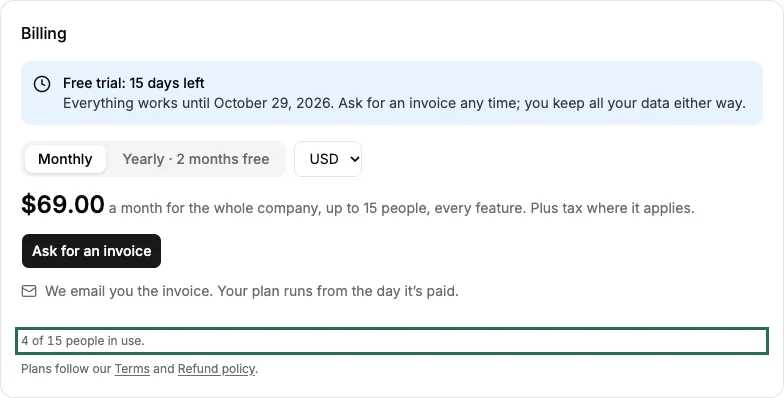
- Choose Monthly or Yearly · 2 months free and your currency, then click Ask for an invoice. We email you the invoice, and your plan runs from the day it’s paid.
- Add people in Team → Add member (how). There’s nothing to buy per person.
The price
Section titled “The price”| Currency | A month | A year |
|---|---|---|
| US dollars | $69 | $690 |
| Pounds | £55 | £550 |
| Euros | €65 | €650 |
| Australian dollars | A$105 | A$1,050 |
Plus tax where it applies. Every new company starts with a 14-day free trial.
Good to know
Section titled “Good to know”- 15 people, you included. Only people who can sign in count: turn off Can sign in for someone who left, and their place is free again. Their hours and notes stay on the jobs.
- When all 15 places are taken, adding someone, or turning Can sign in back on for someone, says Your plan includes 15 people. Deactivate someone first, or write to us for a bigger team.
- Someone who already has a Skuadro account joins when they accept your invitation; if the team is full by then, they can accept once you’ve made room.
- If the trial ends, or a paid period ends and stays unpaid for 7 more days, the company becomes read-only: everyone can still see and export everything, and nothing is lost.
- The iPhone app doesn’t show plans or prices; manage billing on the website.