

Margin and markup
- Who
- Owners
- Where
- Quotes → a quote → the panel under the total.
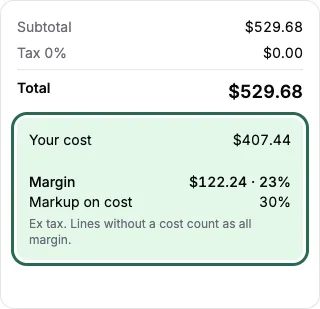
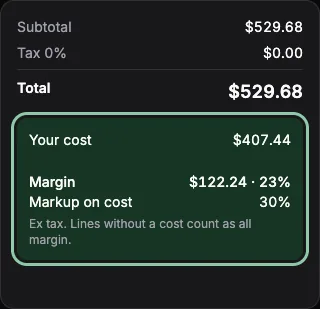
While you price a quote, the panel under its total shows Your cost, the Margin and the Markup on cost, and each line shows its own cost and margin. They change as you type.
Why it’s there
Section titled “Why it’s there”Margin and markup are easy to mix up, and pricing with the wrong one loses money: a 30% markup is only a 23% margin. Seeing both while you price means you know what you’re agreeing to before the customer does.
Who sees it
Section titled “Who sees it”- The panel (Your cost, Margin, Markup on cost): owners, and people whose role lets them see profit (Accountant).
- A line’s cost and margin: people who see that kind of cost. The Estimator role sees them on material lines, but not the panel.
- The customer never sees your costs or margins.
How to use it
Section titled “How to use it”- In a quote, add lines. A material picked from your catalog brings its cost and starts at its cost plus 30%. Under
each line with a cost: its cost and its margin.
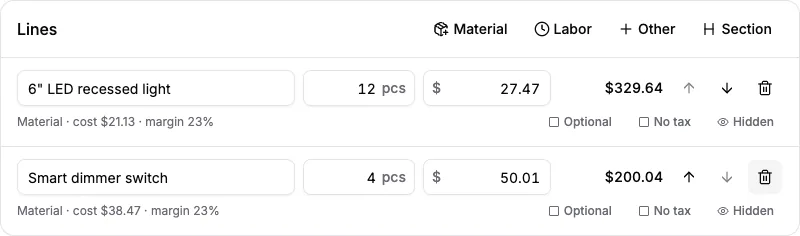
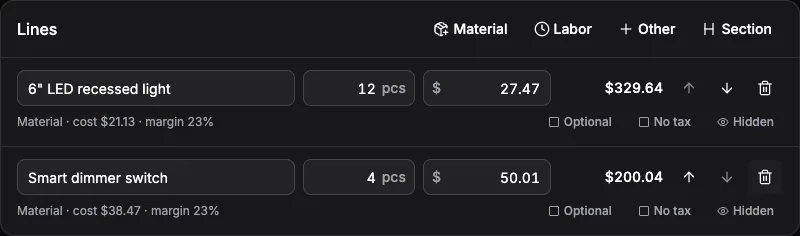
- The panel under the total shows Your cost, the Margin (amount and percent) and the Markup on cost. Change
a price or a quantity and they follow. The panel turns amber when the margin is under 15%.
How it’s counted
Section titled “How it’s counted”- Margin = (total before tax − your cost) ÷ total before tax.
- Markup on cost = (total before tax − your cost) ÷ your cost.
- Both are rounded to whole percents. Without any cost, the markup shows –.
A material that costs you $100.00 and is priced at $130.00: the margin is $30.00 ÷ $130.00 = 23%, the markup is $30.00 ÷ $100.00 = 30%. On a whole job, say an agreed price of $2,210 and costs of $1,747.39: margin 20.9%, markup 26%.
Good to know
Section titled “Good to know”- Only lines with a cost count in Your cost. Lines without one (the Labor and Other lines you add on a quote have none) count as all margin, so the real margin is lower than shown when those lines carry costs too.
- Once two kinds of line have a cost, the cost is split under Your cost by kind: labor, materials and other.
- With options, the numbers are for the first option plus the lines in every option. Optional lines don’t count.
- After the job is done, its Money card shows the real margin from what was actually used (profit on every job). The job shows the margin, not the markup.